분석
워크벤치: 하나의 질문을 문장으로 쓰고 트렌드, 퍼널, 리텐션의 세 가지 방식으로 묻습니다. 결과는 그 자리에서 그려지고, 남길 가치가 있으면 대시보드에 고정합니다.
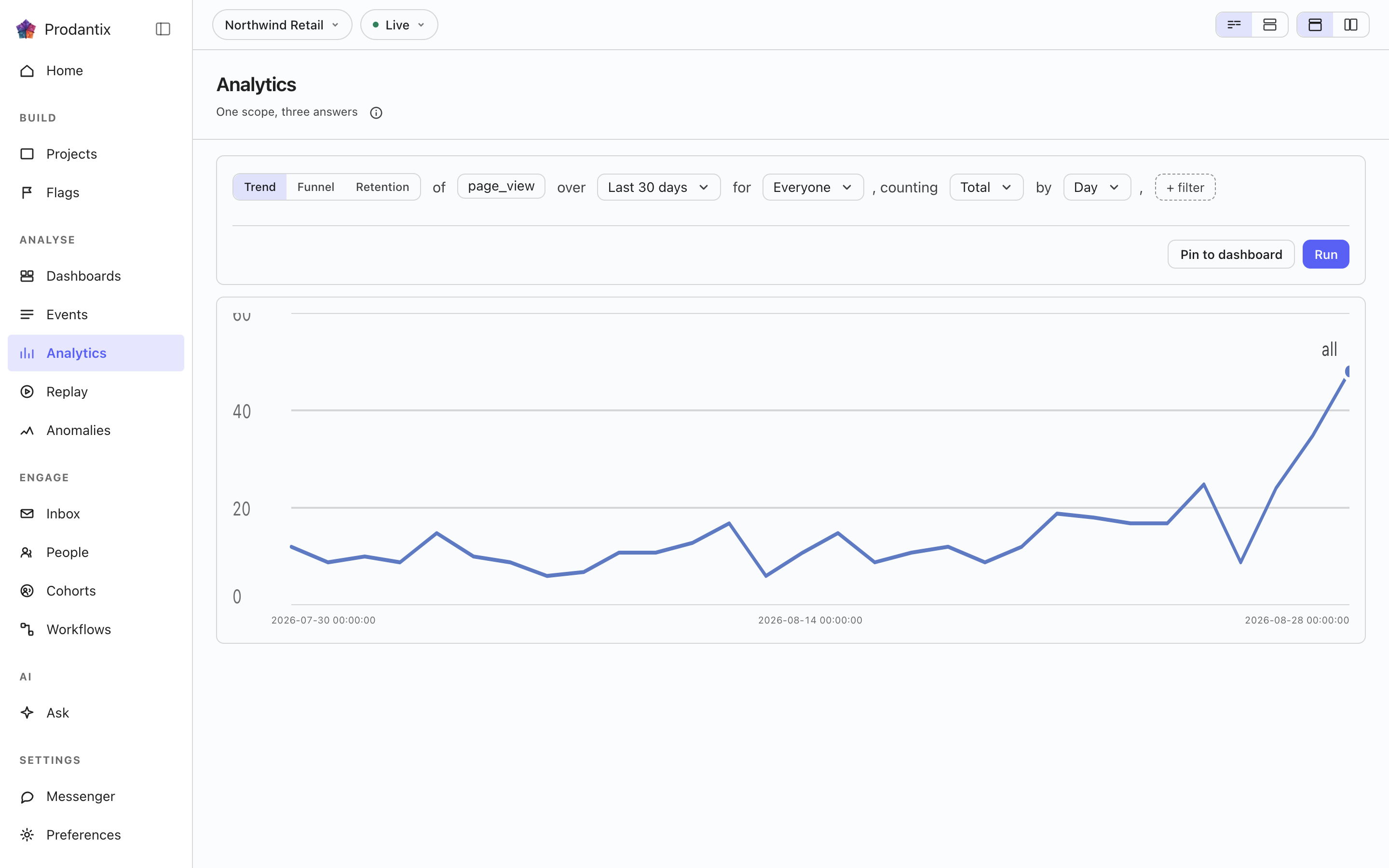
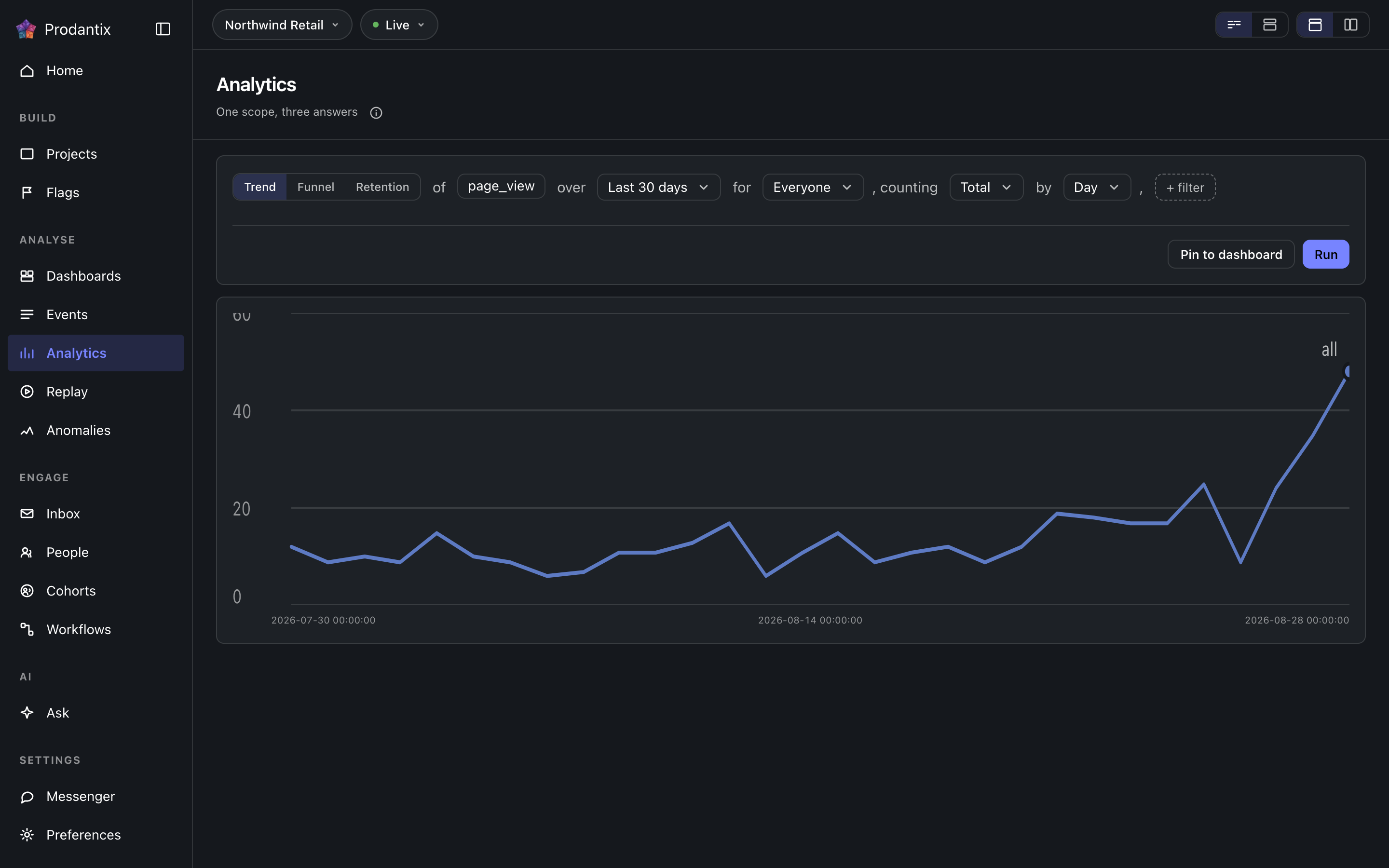
Six modes, one question
A trend counts one event over a range, as totals or unique people, at a granularity the range makes sensible. A funnel orders two or more steps and reports who made it through each. Retention asks who came back: an entry event, a return event and a matrix of periods. Paths asks what happened next, stickiness how many days a period's users came back on, and lifecycle who was new, returning, resurrecting or dormant in each period. Switching modes keeps everything the modes share, so a trend refined into a funnel does not start over.
Metrics and formulas


A trend is not one measure: Add a metric appends a letter, B onward, each its own event and its own total or unique users measure, the scope event staying letter A. Add a formula turns a row into an expression combining those letters with decimal numbers and + - * /, grouped with parentheses, up to 200 characters and never another formula's own letter. A point the formula cannot compute, a division by zero among them, draws as a gap rather than a zero.
The compared period


Compare asks the same question again over the window right before this one: Previous Period, Previous Day, Previous Week, Previous Month, Previous Quarter or Previous Year. Every series in the result gets a past twin, drawn apart from the current one rather than as a plain extra line, and the scope note names which one is picked. The compared period draws on Line, Stacked Line, Column, Stacked Column, Bar, Stacked Bar, Table and Metric; Pie draws the current period only.
Breakdowns


Breakdowns split a trend by up to three fields at once, an event property or one of the columns the DSL allow-lists: every series in the result carries the tuple of values it is one combination of, in the breakdowns' own order. The table reads every combination as its own row; the other chart types read the first breakdown as the series and fold the rest into its key.
Paths: what happened next


Paths start from an anchor event and walk one to five steps forward, or backward, within the anchor's session or a window of minutes or hours. Each step reports its top three, five or ten events with the share of that step's users, the events past the top folded into one row, and the users who took no further step. The default reading is one column per step; the same result reads as a sankey, with a block per event and a ribbon into each block of the next step, or as a tree that nests the next step's events under each event until its caret opens it.
Step by는 한 걸음이 무엇인지를 고릅니다. 이벤트 기준이면 그 걸음은 앵커 뒤에 오는 상위 이벤트 이름들입니다. 페이지 기준이면 페이지 조회만 살피고 각 단계의 키는 호스트와 경로 이름이 되므로, 그 걸음은 페이지 조회, 페이지 조회, 페이지 조회가 아니라 가격, 가입, 결제로 읽힙니다. 앵커도 함께 바뀝니다. 이벤트 칸이 그 기간에 방문자가 실제로 닿은 페이지들의 선택기로 바뀌고, 사용자 수 기준 상위 백 개가 나옵니다. 손으로 적은 페이지 앵커는 무언가를 답하려면 호스트와 경로 이름을 정확히 맞춰야 하기 때문입니다. 생키와 트리에서는 페이지 단계가 경로 이름을 그리고 호스트를 흐린 접두사로 붙이므로, 같은 경로를 쓰는 두 호스트도 구분됩니다.
Stickiness: how many days


Stickiness counts, for each week or month, how many of the event's users were active on one, two, three and more of its days. The result row steps between periods; the column chart reads one period at a time, and the table reads all of them.
Lifecycle: new, returning, resurrecting, dormant


Lifecycle sorts each period's users into four states: new were first seen in the period, returning were active in it and the period before, resurrecting came back after a period away, and dormant were active the period before and not in this one. First-seen reads the whole retained history, so a user is new once; activity is read one period before the range, so the first period's returning and dormant counts are real rather than zero by construction. The stacked column draws dormant below the zero line; the table adds a net column.
The sentence and its clauses


The question reads as a sentence: measure, event, range and any clauses, each word an editable control with the project's own event names suggested as you type. Property clauses narrow by what an event carried; a cohort clause scopes the whole question to a saved cohort. Whether the question composes as one sentence or as labelled groups is a stored preference, as is the split or stacked layout; nothing runs until Run, so a half-edited question never fires.
측정값, 이벤트, 제외
각 지표는 이벤트를 총합이나 고유 사용자로 세거나, 이벤트가 담고 있던 숫자를 읽습니다. 측정값 선택기는 Count, Sum of, Average of로 묶여 있고, 뒤의 두 묶음에는 지표의 이벤트가 숫자로 보낸 모든 속성이 나열되며, 그러면 그 줄은 the sum of amount로 읽힙니다. 지표의 이벤트 칸에는 최대 8개의 이벤트를 넣을 수 있고, 이들은 지표의 글자 아래 하나의 시리즈로 함께 세어지며 센 모든 이벤트가 레이블에 붙습니다. 추세에서는 코호트 뒤의 Exclude로 기간 안에 최대 8개 이벤트 중 하나라도 한 사람을 People who did an event로, 질문이 한정한 코호트가 아닌 다른 코호트를 A cohort로, 또는 둘 다 제외합니다. 각 분류에도 제외할 값을 지정할 수 있습니다. 기간은 날짜 선택기입니다. Today, Yesterday, Last 7 days, Last 30 days, Last 3 months, Last 6 months, Last 12 months 중에서 고르거나 두 달 달력에서 원하는 날짜 범위를 고릅니다. 날짜는 데이터 웨어하우스가 세는 방식대로 UTC 날짜이며, 상대 기간은 이름으로 저장되므로 Last 30 days로 저장한 보고서는 언제나 최근 30일을 읽습니다. 전송 시 지표는 추가 이벤트를 orEvents로, 쿼리는 excludeDid와 excludeCohort를 담고, 속성 목록은 eventCatalog의 numericProperties입니다.
Reading a result as another chart


Every result row ends with the chart type it is read in. The menu lists Line, Stacked Line, Column, Stacked Column, Bar, Stacked Bar, Pie, Table, Metric, Funnel Steps, Retention Curve, Ranked Columns, Sankey and Tree, in that order, with the ones the result cannot take greyed rather than hidden. A trend, a stickiness period and a lifecycle take any of the series types; funnel steps take a funnel; the retention curve draws one line per cohort over its matrix; ranked columns, the sankey and the tree read paths; the table reads everything. Each mode remembers the type you chose, the URL carries it as ?chart=, and a pinned tile keeps it.
차트 설정
차트 유형 옆의 설정 버튼은 페이지의 레이아웃 선택기가 정한 대로 팝오버, 차트 옆 패널 또는 대화상자로 차트 자체의 설정을 엽니다. Left axis와 Right axis 탭은 각 축을 표시할지, 제목, 단위(개수, 통화, 백분율 또는 사용자 지정), 접두사와 접미사, 큰 숫자를 줄여 쓸지, 결과 미리보기와 함께 소수 자릿수, 벗어나는 값을 가장자리에 자르거나 생략하는 고정 최솟값과 최댓값 경계, 그리고 선형 또는 로그 눈금을 설정합니다. Time axis 탭은 시간 축을 표시하거나 숨기고, 제목을 붙이며, 일별 또는 시간별 차트에서 주말에 음영을 넣습니다. Series 탭은 각 지표나 수식을 왼쪽 또는 오른쪽 축으로 옮기고(질문에 있는 각 지표의 행에서도 할 수 있습니다), Standard 팔레트나 색각 이상에 안전한 팔레트를 고릅니다. 모든 변경은 즉시 차트를 다시 그립니다. 저장된 보고서나 인사이트는 설정을 유지하고, 버전 기록은 설정 변경을 표시하며, 고정한 타일은 휴대폰에서도 그 설정으로 그려집니다. 통신에서는 보고서, 인사이트, 타일의 viz 옆에 chart 필드로 전달됩니다.
결과 표
차트 아래에서 추세의 결과 표는 시리즈마다 한 행을 보여 줍니다. 선을 그린 색 견본, 분류 값(질문에 글자가 여러 개이거나 분류가 없으면 지표), 총합 열과 기간별 열이 있고, 추세를 비교할 때는 각 기간 옆에 과거 쌍이 붙습니다. 행의 체크박스를 해제하거나 색 견본을 클릭하면 그 선이 차트에서 빠집니다. 행은 흐린 글자와 속이 빈 견본으로 표에 남고, 범례도 속이 빈 채로 남기며, 머리글의 체크박스는 모든 행을 되돌리거나 모두 뺍니다. 표 위의 검색 칸은 값에 입력한 글자가 들어 있는 행으로 좁히며, 차트에서 선을 빼지는 않습니다. 결과 행의 보기 그룹은 차트, 표, 차트와 표 사이를 전환하며, 결과는 차트와 표로 열립니다. 차트 유형이 표이면 표가 곧 차트이므로 그룹이 사라집니다. 보기와 뺀 행은 차트 설정의 일부로 보고서와 함께 chart 필드의 view와 hidden에 저장되므로, 저장된 보고서, 인사이트, 고정된 타일이 같은 선을 그립니다. 휴대폰에서도 마찬가지입니다. 다른 모드는 차트 아래에 자체 표를 보여 주며, 검색은 되지만 행 선택은 없습니다.
차트 위의 줄은 결과가 얼마나 전에 실행되었는지 알려 주며, 차트 설정 옆의 새로고침은 같은 질문을 다시 합니다. 그 이후 문장에 가한 변경은 실행을 기다립니다.
포인트에서 작업하기
차트의 포인트를 클릭하면 그 포인트 자체를 제목으로 한 메뉴가 열립니다: 계열, 구간, 값입니다. 휴대폰에서는 길게 누르면 같은 메뉴가 열립니다. 이 리포트는 질문을 바꾸고 다시 실행합니다. 확대는 추세나 라이프사이클을 클릭한 구간으로 좁히고 한 단계 더 세분합니다: 월은 주로, 주는 일로, 추세의 일은 시간으로 바뀝니다. 분류의 포인트에서는 필터 행이 각 값마다 필터를 추가하고, 제외 행이 값 하나를 분류에서 뺍니다. 값마다 한 줄입니다. 분류가 없는 포인트에서는 둘 다 이 항목으로 필터와 이 항목 제외로 흐리게 남습니다. 자세히 보기는 모든 모드에서 포인트를 이룬 사람과 일을 나열합니다: 추세나 라이프사이클의 구간, 퍼널 단계, 리텐션 셀, 경로의 이벤트, 고착도 열이 각자 자신의 대상을 보여 줍니다. 사용자 보기, 이벤트 보기, 재생 보기는 기본적으로 대화상자에서 열고, 분석 페이지의 선택기 설정에 따라 사이드 패널이나 페이지 자체에서 엽니다. 사람에서 열기(또는 이벤트, 리플레이)는 포인트를 해당 페이지로 가져가고, 그곳에서 칩이 포인트를 표시하며 지울 수 있습니다. 선택기가 포인트를 곧바로 페이지로 보내면 리포트로 돌아가기로 질문에 돌아갑니다. 설명에는 근본 원인 분석이 있습니다: 앞에 구간이 있고 합계나 고유 사용자를 세는 추세 포인트에서, 선이 두 구간 사이에서 왜 오르거나 내렸는지 묻는 질문을 Ask에 작성합니다. API에서 포인트는 projectPeople와 replaySessions의 point 인수로, 그리고 events의 필터 안에서 전달됩니다: 리포트의 종류와 쿼리에, 포인트를 가리키는 구간, 단계, 이벤트, 코호트, 기간, 활동 일수 또는 상태가 더해집니다.
주석
포인트 메뉴의 주석 추가는 그날 또는 달력에서 고른 기간을 메모와 최대 10개의 태그로 표시합니다. 보고서에서는 표시 위치로 주석을 그 보고서에만 두거나, 기간이 이 날짜를 포함하는 프로젝트의 모든 차트에 표시할 수 있습니다. 보고서로 저장되지 않은 질문에서는 프로젝트의 차트에 표시됩니다. 날짜 축에는 마커가 놓이며, 포인터를 올리면 선과 함께 메모, 태그, 날짜, 추가한 사람을 담은 카드가 나타나고, 클릭하면 작성자와 주석을 쓸 수 있는 사람에게 편집과 삭제가 있는 카드가 열린 채로 유지됩니다. 차트 설정의 주석 탭은 주석을 나열하고 끈 태그를 숨기며, 이 설정은 보고서와 함께 저장됩니다. 보드의 타일에도 같은 마커가 그려집니다. API에서는 annotations, createAnnotation, updateAnnotation, deleteAnnotation, annotationChanges 구독, /v1/projects/{projectId}/annotations로 제공되며, 에이전트는 prodantix.annotations.list와 prodantix.annotations.create로 주석을 읽고 추가합니다.
Results, and keeping them
A trend draws as a series, a funnel as its steps with the drop between them, retention as a matrix whose rows are entry periods, paths as ranked columns per step, stickiness as columns over days active and lifecycle as a stacked column. Once a result exists, Pin saves the question to a board on Saved, where its tile re-runs the query on every open and draws it as the chart type it was pinned in.
Pin 옆에 Save가 있습니다. 첫 행은 As an insight로, 질문을 편집기와 차트째로, 프롬프트에서 물은 이름 아래 통째로 보관하고, 카드 머리는 열린 인사이트를 칩으로 나타냅니다. 주소는 ?insight=를 지니므로 링크가 그것을 다시 엽니다. 질문을 편집하면 Save의 첫 행인 Update가 편집을 저장된 것 위에 쓰거나 둘째 행인 Save as a new insight가 편집을 다른 인사이트로 보관할 때까지 칩은 이름 뒤에 changed라고 읽힙니다. 다음 행은 Users as a cohort로, 결과가 센 사람들에게 이름을 붙여 정적 코호트로 보관합니다. 목록은 실행된 쿼리 그대로 서버에서 구체화되므로 차트가 그린 사람이 아니라 결과가 센 모두를 100,000명까지 담고, 아무도 세지 않은 결과는 거부됩니다. 코호트는 읽힌 문장을 보관하며 고정 목록이므로 다시 평가되지 않습니다: 다음 주에 같은 질문을 하면 다음 주에 대해 답하지만, 코호트는 오늘 센 사람을 그대로 담습니다. 저장된 인사이트는 Saved의 Insights 탭에 나열됩니다. 구분선 아래에는 CSV로 내보내기가 있습니다. 서버는 실행된 그대로의 쿼리로 결과를 스프레드시트로 작성하며, 기간과 분류마다 한 행, 지표 문자마다 한 열로, 차트가 그리는 상위 몇 개가 아니라 엔진의 한도인 천 개까지의 모든 조합을 담고, 도구와 기간으로 파일 이름을 붙입니다. 마지막은 임계값 모니터링으로, 추세 결과에서만 작동합니다: 결과가 아직 인사이트가 아니면 인사이트로 저장한 다음, 첫 지표에 하나의 경계를 설정합니다. 초과, 미만 또는 어떤 값만큼 변화로, 인사이트의 마지막 완전한 구간에 대해 하루에 한 번 확인됩니다. 경계를 넘는 동안 인사이트는 조치 필요에 나열되고, 다시 연 인사이트는 경계를 차트에 띠로 그리며, 값이 돌아오면 알림은 스스로 사라집니다.
Save as report는 질문을 보드 위의 리포트로 남깁니다. 두 단계로, 먼저 이름과 설명, 다음으로 보드를 세 줄 높이의 검색되는 목록에서 고르며, 그 아래에 New board가 있습니다. 이후 주소는 ?report=를 지니고, 페이지 머리는 프로젝트 › 보드 › 리포트로 읽히며 보드는 링크입니다. 카드 머리는 열린 리포트를 칩으로 나타내고, 편집기가 저장된 것과 달라지면 이름 뒤에 changed라고 읽히며, Save report가 편집을 다음 버전으로 쓰거나 Save as new report가 그것을 다른 리포트로 남길 때까지 그렇습니다. 리포트가 열려 있으면 Save 메뉴에서 이름 바꾸기, 다른 보드로 옮기기, 복제하기도 할 수 있습니다. 이동은 즉시 반영되고 스낵바가 Undo와 함께 알립니다. 카드 아래의 버전 띠는 현재 버전, 누가 언제 저장했는지를 알려 줍니다. Show history는 모든 버전을 무엇이 바뀌었는지, 누가, 언제와 함께 세 항목씩 보이게 펼치고, 현재 버전을 제외한 각 항목 옆에 Restore가 있으며, 복원은 기록을 다시 쓰는 대신 선택한 버전을 복사한 새 버전을 씁니다. 리포트는 Saved의 Reports 탭에 나열됩니다.
보고서 공유하기
저장된 보고서를 열면 실행 줄에 Copy link와 Share가 나타납니다. Copy link는 보고서 주소를 기간, 코호트, 필터와 함께 복사하며, 회사에서 이 보고서를 열 수 있는 사람은 누구나 열 수 있습니다. Share는 두 개의 탭을 열며 Teammates가 먼저입니다. Teammates는 보고서를 회사 안의 최대 20명에게 보내고, 메모를 추가하면 함께 보냅니다. 각자 콘솔 알림으로 받고, 푸시를 켠 기기에서는 푸시로, 그리고 이메일로 받습니다. 대화 상자는 열린 채로 누구에게 보냈는지 알려 줍니다.
Public link는 링크가 있는 누구나 로그인 없이 열 수 있는 보기 전용 페이지를 만듭니다. 마지막 실행 시점의 보고서로, 차트와 숫자는 포함하지만 질문의 필터, 코호트, 사람은 포함하지 않으며, 저장된 그대로 보고서를 실행할 때마다 새로 고쳐집니다. 링크는 선택한 날의 끝에 작동을 멈추며 내일부터 90일 후까지 고를 수 있고 처음에는 In 30 days입니다. 켜져 있는 동안 다른 날을 고르면 갱신되고, 끄면 즉시 멈춥니다. 공개 링크를 만들려면 별도의 권한이 필요하며 에이전트는 이 권한을 결코 갖지 않습니다. 이 권한이 없는 역할은 스위치가 비활성화된 채로 그 사실을 알리는 한 줄과 함께 보게 됩니다.
Where this meets the API
The concept is the Analytics pillar. On the wire, the six modes are six queries: runQuery, runFunnel, runRetention, runPaths, runStickiness and runLifecycle, with event names suggested from eventCatalog and, for a path stepping by page, the anchors from pathsPages (GraphQL reference). Pinning writes the question into a board through updateDashboard, with the report's kind and the chart type beside its query; saving an insight is createInsight, Update is updateInsight, and Saved's Insights tab reads insights. Save as report is createReport, Save report is updateReport, the strip's Restore is restoreReportVersion, and Saved's Reports tab reads reports. Sharing reads the public link with reportPublicLink, turns it on or renews it with setReportPublicLink, turns it off with turnOffReportPublicLink and sends to teammates with shareReport, while reportShareChanges streams every change; a visitor's page reads /v1/shared-reports/{token} (API reference).