分析
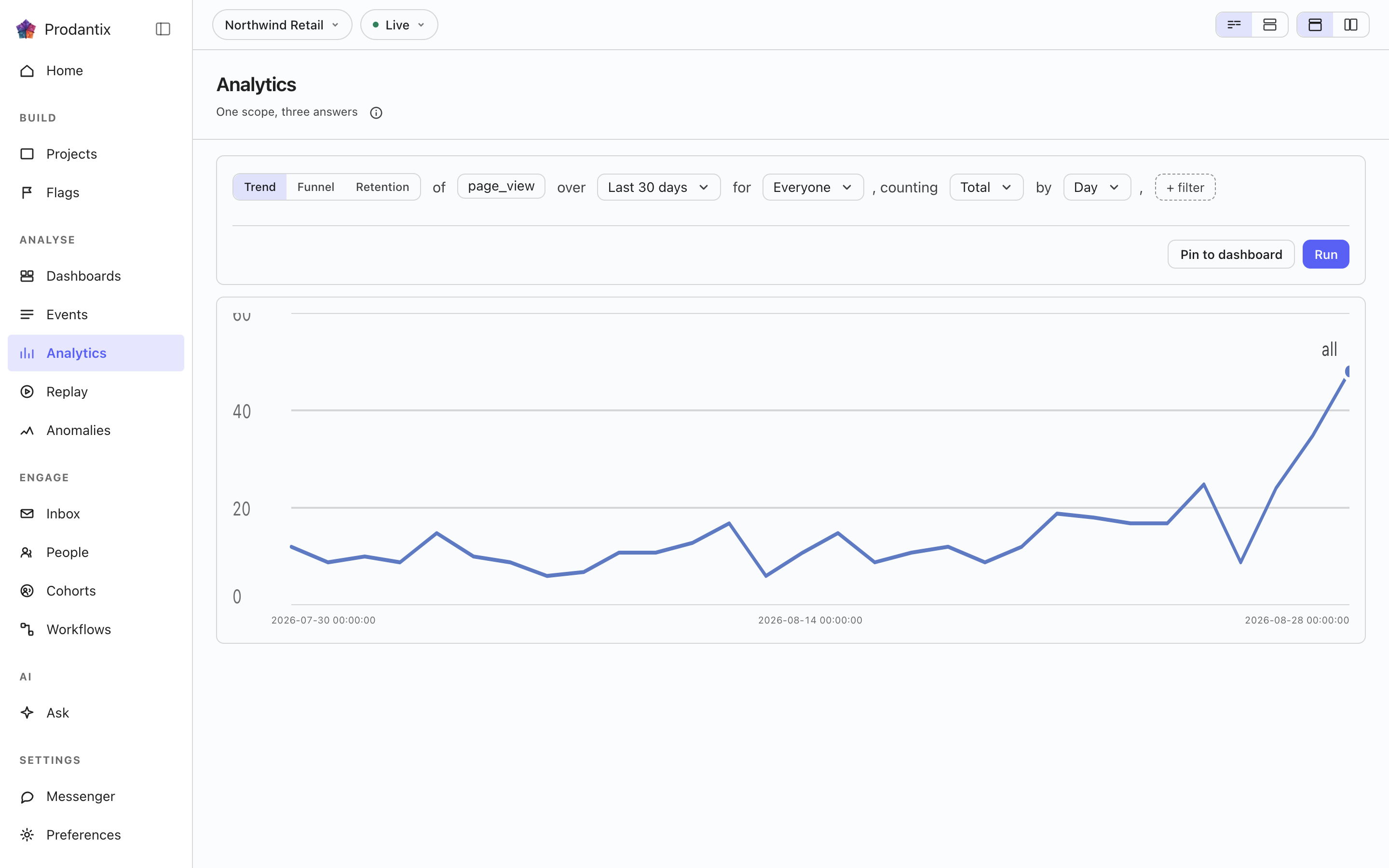
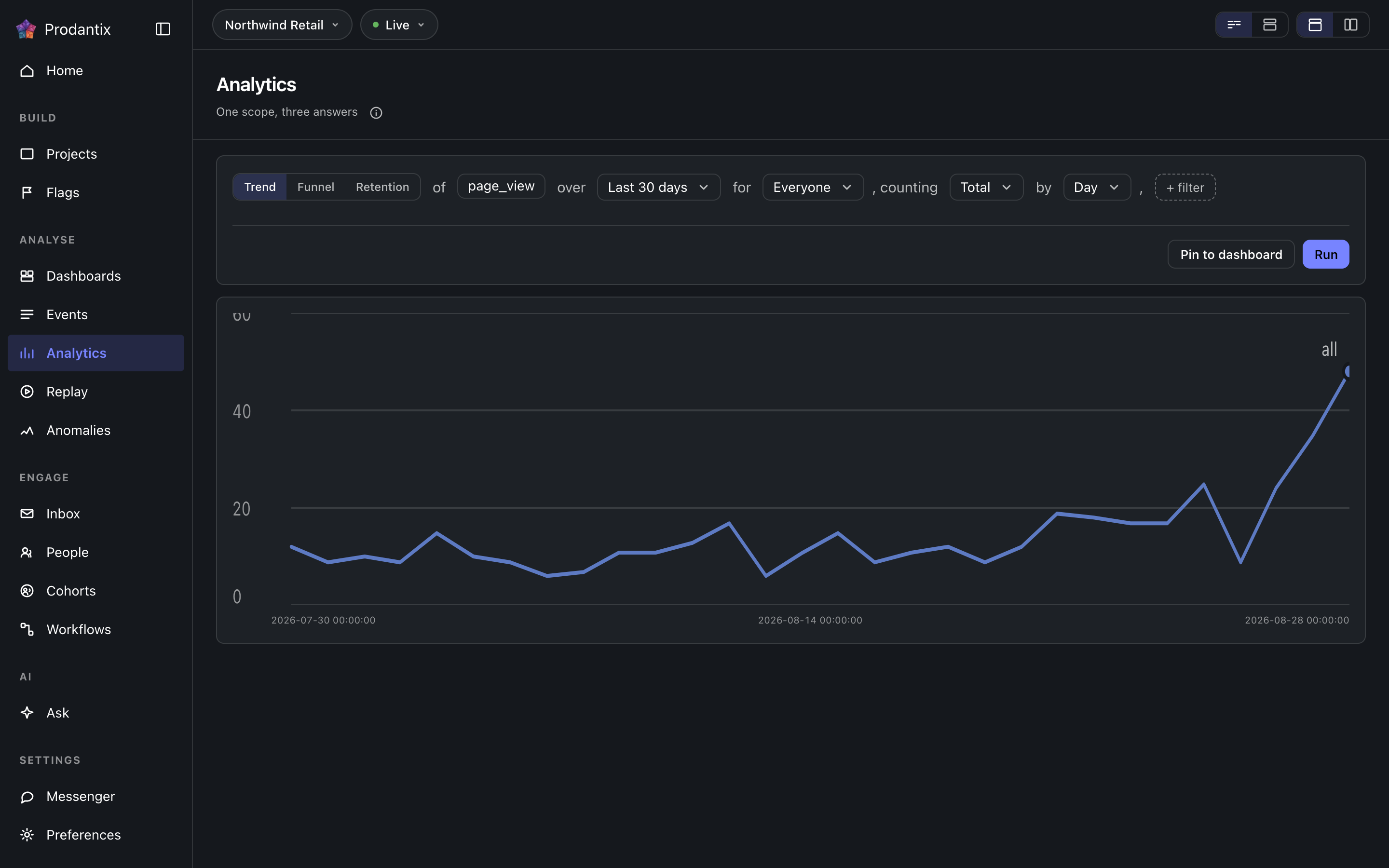
ワークベンチ: ひとつの問いを文として書き、トレンド、ファネル、リテンションの三つの形で尋ねます。結果はその場に描かれ、残す価値があればダッシュボードにピン留めできます。
Six modes, one question
A trend counts one event over a range, as totals or unique people, at a granularity the range makes sensible. A funnel orders two or more steps and reports who made it through each. Retention asks who came back: an entry event, a return event and a matrix of periods. Paths asks what happened next, stickiness how many days a period's users came back on, and lifecycle who was new, returning, resurrecting or dormant in each period. Switching modes keeps everything the modes share, so a trend refined into a funnel does not start over.
Metrics and formulas


A trend is not one measure: Add a metric appends a letter, B onward, each its own event and its own total or unique users measure, the scope event staying letter A. Add a formula turns a row into an expression combining those letters with decimal numbers and + - * /, grouped with parentheses, up to 200 characters and never another formula's own letter. A point the formula cannot compute, a division by zero among them, draws as a gap rather than a zero.
The compared period


Compare asks the same question again over the window right before this one: Previous Period, Previous Day, Previous Week, Previous Month, Previous Quarter or Previous Year. Every series in the result gets a past twin, drawn apart from the current one rather than as a plain extra line, and the scope note names which one is picked. The compared period draws on Line, Stacked Line, Column, Stacked Column, Bar, Stacked Bar, Table and Metric; Pie draws the current period only.
Breakdowns


Breakdowns split a trend by up to three fields at once, an event property or one of the columns the DSL allow-lists: every series in the result carries the tuple of values it is one combination of, in the breakdowns' own order. The table reads every combination as its own row; the other chart types read the first breakdown as the series and fold the rest into its key.
Paths: what happened next


Paths start from an anchor event and walk one to five steps forward, or backward, within the anchor's session or a window of minutes or hours. Each step reports its top three, five or ten events with the share of that step's users, the events past the top folded into one row, and the users who took no further step. The default reading is one column per step; the same result reads as a sankey, with a block per event and a ribbon into each block of the next step, or as a tree that nests the next step's events under each event until its caret opens it.
Step by は一歩が何かを選びます。イベント単位なら、その歩みはアンカーの後に続く上位のイベント名です。ページ単位なら、ページビューだけを見て、各ステップの鍵はホストとパス名になります。したがって歩みは、ページビュー、ページビュー、ページビューではなく、料金、登録、決済と読めます。アンカーも一緒に変わります。イベント欄は、期間中に訪問者が実際に到達したページの選択肢になり、ユーザー数の上位百件が並びます。手で打ったページのアンカーは、何かを答えるためにホストとパス名を寸分たがわず一致させねばならないからです。サンキーとツリーでは、ページのステップはパス名を描き、ホストを控えめな接頭辞として添えるので、同じパスを共有する二つのホストも見分けがつきます。
Stickiness: how many days


Stickiness counts, for each week or month, how many of the event's users were active on one, two, three and more of its days. The result row steps between periods; the column chart reads one period at a time, and the table reads all of them.
Lifecycle: new, returning, resurrecting, dormant


Lifecycle sorts each period's users into four states: new were first seen in the period, returning were active in it and the period before, resurrecting came back after a period away, and dormant were active the period before and not in this one. First-seen reads the whole retained history, so a user is new once; activity is read one period before the range, so the first period's returning and dormant counts are real rather than zero by construction. The stacked column draws dormant below the zero line; the table adds a net column.
The sentence and its clauses


The question reads as a sentence: measure, event, range and any clauses, each word an editable control with the project's own event names suggested as you type. Property clauses narrow by what an event carried; a cohort clause scopes the whole question to a saved cohort. Whether the question composes as one sentence or as labelled groups is a stored preference, as is the split or stacked layout; nothing runs until Run, so a half-edited question never fires.
集計方法、イベント、除外
各メトリクスはイベントを合計またはユニークユーザーとして数えるか、イベントが持っていた数値を読み取ります。集計方法の選択肢は Count、Sum of、Average of に分かれ、後の二つにはそのメトリクスのイベントが数値として送ったすべてのプロパティが並び、行は the sum of amount と読めます。メトリクスのイベント欄には最大 8 件のイベントを入れられ、それらはメトリクスの文字の下で一つの系列としてまとめて数えられ、数えたすべてのイベント名がラベルになります。トレンドでは、コホートの後の Exclude で、期間内に最大 8 件のイベントのいずれかを行った人を People who did an event として、質問が絞り込んでいるコホート以外のコホートを A cohort として、またはその両方を除外できます。各内訳にも除外する値を指定できます。期間は日付ピッカーで選びます。Today、Yesterday、Last 7 days、Last 30 days、Last 3 months、Last 6 months、Last 12 months のほか、2 か月カレンダーで任意の日の範囲を選べます。日はデータウェアハウスの数え方と同じ UTC の日で、相対期間は名前で保存されるため、Last 30 days で保存したレポートは常に直近 30 日を読みます。通信上では、メトリクスは追加のイベントを orEvents で運び、クエリは excludeDid と excludeCohort を運び、プロパティの一覧は eventCatalog の numericProperties です。
Reading a result as another chart


Every result row ends with the chart type it is read in. The menu lists Line, Stacked Line, Column, Stacked Column, Bar, Stacked Bar, Pie, Table, Metric, Funnel Steps, Retention Curve, Ranked Columns, Sankey and Tree, in that order, with the ones the result cannot take greyed rather than hidden. A trend, a stickiness period and a lifecycle take any of the series types; funnel steps take a funnel; the retention curve draws one line per cohort over its matrix; ranked columns, the sankey and the tree read paths; the table reads everything. Each mode remembers the type you chose, the URL carries it as ?chart=, and a pinned tile keeps it.
チャートの設定
チャートの種類の横にある設定ボタンは、ページのレイアウト選択で指定されたとおり、ポップオーバー、チャート横のパネル、またはダイアログとしてチャート自身の設定を開きます。Left axis と Right axis のタブでは、各軸を表示するかどうか、そのタイトル、単位(件数、通貨、パーセント、カスタム)、接頭辞と接尾辞、大きな数を省略するかどうか、結果のプレビュー付きの小数点以下の桁数、超えた値を端で切り詰めるか省く固定の最小値と最大値、そして線形または対数の目盛りを設定します。Time axis タブでは時間軸を表示または非表示にし、タイトルを付け、日単位や時間単位のチャートで週末に網掛けします。Series タブでは各指標や数式を左軸または右軸に移し(質問の中の各指標の行でも同じことができます)、Standard パレットか色覚多様性に配慮したパレットを選びます。どの変更もすぐにチャートを描き直します。保存したレポートやインサイトは設定を保持し、バージョン履歴はその変更を示し、ピン留めしたタイルは電話でもその設定で描かれます。通信上では、これらはレポート、インサイト、タイルの viz の横に chart フィールドとして送られます。
結果の表
チャートの下には、トレンドの結果の表が系列ごとに1行を並べます。線を描いた色の見本、内訳の値(質問に複数の文字があるか内訳がない場合はメトリクス)、総和 の列と期間ごとの列が並び、トレンドを比較しているときは各期間の横に過去の対が付きます。行のチェックボックスを外すか色の見本をクリックすると、その線はチャートから外れます。行は薄い文字と中抜きの見本で表に残り、凡例も中抜きで残し、見出しのチェックボックスはすべての行を戻すか、すべて外します。表の上の検索欄は、値に入力した文字を含む行だけに絞り込み、チャートから線を外すことはありません。結果の行にある表示グループは チャート、表、チャートと表 を切り替え、結果は チャートと表 で開きます。チャートの種類が 表 のときは表そのものがチャートなので、グループは表示されません。表示と外した行はチャート設定の一部としてレポートと一緒に chart フィールドの view と hidden に保存されるため、保存したレポート、インサイト、ピン留めしたタイルは同じ線を描きます。スマートフォンでも同じです。ほかのモードはチャートの下に独自の表を表示し、検索はできますが行の選択はありません。
グラフの上の行には結果がどれくらい前に実行されたかが表示され、グラフ設定の横にある更新は同じ質問をもう一度実行します。その後に文へ加えた変更は実行を押すまで反映されません。
ポイントに対する操作
グラフ上のポイントをクリックすると、そのポイント自体を題名にしたメニューが開きます。系列、区間、値です。スマートフォンでは長押しで同じメニューが開きます。このレポートは問いを変えて実行し直します。ズームインはトレンドやライフサイクルをクリックした区間に絞り、一段細かくします。月は週に、週は日に、トレンドの日は時間になります。内訳のポイントでは、絞り込みの行がその値ごとにフィルターを追加し、除外の行が値をひとつ内訳から外します。値ごとに一行です。内訳のないポイントでは、どちらもこれで絞り込むとこれを除外として灰色のままです。詳しく見るは、どのモードでもポイントを形作った人と出来事を一覧にします。トレンドやライフサイクルの区間、ファネルのステップ、リテンションのセル、パス上のイベント、スティッキネスの列が、それぞれ自分の対象を示します。ユーザーを見る、イベントを見る、リプレイを見るは、既定ではダイアログで、分析ページの選択に応じてサイドパネルやページ自体で開きます。ユーザーで開く(またはイベント、リプレイ)はポイントをそのページに運び、そこでチップがポイントを示し、解除できます。選択がポイントを直接ページに送るときは、レポートに戻るで問いに戻ります。説明には根本原因分析があります。前に区間があり、合計またはユニークユーザーを数えるトレンドのポイントで、線が二つの間でなぜ上がったか下がったかという問いを Ask に下書きします。API では、ポイントは projectPeople と replaySessions の point 引数として、また events のフィルターの中で送られます。レポートの種類とクエリに、ポイントを示す区間、ステップ、イベント、コホート、期間、アクティブ日数、または状態が加わります。
注釈
ポイントのメニューの注釈を追加では、その日、またはカレンダーで選んだ期間に、メモと最大 10 個のタグで印を付けられます。レポートでは、表示先で注釈をそのレポートだけに残すか、期間がその日付を含むプロジェクトのすべてのグラフに表示するかを選べます。レポートとして保存されていない質問では、プロジェクトのグラフに表示されます。日付軸にはマーカーが置かれ、ポインターを合わせると線と、メモ、タグ、日付、追加した人を示すカードが表示されます。クリックするとカードが開いたままになり、作成者と注釈を書く権限のある人には編集と削除が表示されます。グラフ設定の注釈タブには注釈が一覧表示され、オフにしたタグは非表示になり、その設定はレポートと一緒に保存されます。ボードのタイルにも同じマーカーが表示されます。API では annotations、createAnnotation、updateAnnotation、deleteAnnotation、annotationChanges サブスクリプション、/v1/projects/{projectId}/annotations として提供され、エージェントは prodantix.annotations.list と prodantix.annotations.create で読み取りと追加を行います。
Results, and keeping them
A trend draws as a series, a funnel as its steps with the drop between them, retention as a matrix whose rows are entry periods, paths as ranked columns per step, stickiness as columns over days active and lifecycle as a stacked column. Once a result exists, Pin saves the question to a board on Saved, where its tile re-runs the query on every open and draws it as the chart type it was pinned in.
Pin の隣に Save があります。その最初の行は As an insight で、問いをエディタとチャートごと、プロンプトで尋ねた名前の下にそのまま保ち、カードの頭が開いているインサイトをチップで示します。アドレスは ?insight= を持つので、リンクはそれを開き直します。問いを編集すると、Save の最初の行が Update となって編集を保存済みの上に書くか、二つ目の行の Save as a new insight が編集を別のインサイトとして保つまで、チップは名前の後に changed と読みます。次の行は Users as a cohort で、結果が数えた人々に名前を付け、静的コホートとして保ちます。名簿は実行されたクエリからサーバー側で実体化されるため、チャートが描いた人ではなく結果が数えた全員を、100,000 人まで保ち、誰も数えなかった結果は拒否されます。コホートは読まれたときの文を保ち、固定された名簿なので再評価されません: 来週同じ問いを尋ねれば来週について答えますが、コホートは今日数えた人をそのまま保ちます。保存したインサイトは Saved の Insights タブに並びます。 区切り線の下にCSVをエクスポートがあります。サーバーは実行時のクエリから結果をスプレッドシートとして書き出し、期間と内訳ごとに1行、指標の文字ごとに1列で、グラフが描く上位数件ではなくエンジンの上限である千通りまでの全組み合わせを含め、ツール名と期間でファイル名を付けます。最後にあるのは閾値を監視で、トレンドの結果でのみ機能します: まだインサイトでなければ結果をインサイトとして保存し、その最初の指標に一つの境界を、上回る、下回る、またはある値だけ変化するという形で設定し、インサイトの最後の完全な期間ごとに一日一回確認します。境界を超えている間、そのインサイトは要対応に一覧され、開き直したインサイトは境界をチャート上に帯として描き、値が戻るとアラートは自動的に消えます。
Save as report は問いをボード上のレポートとして残します。二段階で、まず名前と説明、次にボードを、三行分の高さの検索できる一覧から選び、その下に New board があります。以後アドレスは ?report= を持ち、ページの頭はプロジェクト › ボード › レポートと読め、ボードはリンクです。カードの頭は開いているレポートをチップで示し、エディタが保存内容と違えば名前の後に changed と読めます。Save report が編集を次のバージョンとして書くか、Save as new report が別のレポートとして残すまでです。レポートを開いているとき、Save メニューからは改名、別のボードへの移動、複製もできます。移動はすぐに反映され、スナックバーが Undo とともに知らせます。カードの下では、バージョンの帯が現在のバージョン、誰がいつ保存したかを示します。Show history はすべてのバージョンを、何が変わったか、誰が、いつ、と三件ずつ見える形で広げ、現在以外の各項目に Restore があります。復元は履歴を書き換えるのではなく、選んだものを写した新しいバージョンを書きます。レポートは Saved の Reports タブに並びます。
レポートを共有する
保存済みのレポートを開くと、実行行に Copy link と Share が表示されます。Copy link はレポートのアドレスを期間、コホート、フィルター付きでコピーし、レポートを開ける社内の誰でもそれを開けます。Share は 2 つのタブを開き、最初は Teammates です。Teammates はレポートを社内の最大 20 人に送信し、メモを追加すればそれも添えます。各自はコンソールの通知で受け取り、プッシュをオンにしている端末ではプッシュでも、さらにメールでも受け取ります。ダイアログは開いたままで、誰に送信したかを表示します。
Public link は、リンクを持つ人なら誰でもサインインせずに開ける閲覧専用ページを作ります。内容は最終実行時点のレポートで、グラフと数値を含みますが、質問のフィルター、コホート、人物は含みません。保存どおりにレポートを実行するたびに更新されます。リンクは選んだ日の終わりに無効になり、明日から 90 日後まで選べ、初期値は In 30 days です。オンの間に別の日を選ぶと更新され、オフにするとすぐに停止します。公開リンクの作成には専用の権限が必要で、エージェントがこれを持つことはありません。この権限のないロールにはスイッチが無効で表示され、その旨を示す一行が添えられます。
Where this meets the API
The concept is the Analytics pillar. On the wire, the six modes are six queries: runQuery, runFunnel, runRetention, runPaths, runStickiness and runLifecycle, with event names suggested from eventCatalog and, for a path stepping by page, the anchors from pathsPages (GraphQL reference). Pinning writes the question into a board through updateDashboard, with the report's kind and the chart type beside its query; saving an insight is createInsight, Update is updateInsight, and Saved's Insights tab reads insights. Save as report is createReport, Save report is updateReport, the strip's Restore is restoreReportVersion, and Saved's Reports tab reads reports. Sharing reads the public link with reportPublicLink, turns it on or renews it with setReportPublicLink, turns it off with turnOffReportPublicLink and sends to teammates with shareReport, while reportShareChanges streams every change; a visitor's page reads /v1/shared-reports/{token} (API reference).