ትንታኔ
የመሳሪያ መስሪያው: አንድ ጥያቄ እንደ ዓረፍተ ነገር ተጽፎ በሶስት መንገዶች ይጠየቃል፣ አዝማሚያ፣ ፈንል ወይም ማቆያ። ውጤቱ በቦታው ይሳላል፣ የሚጠቅም ከሆነም ወደ ዳሽቦርድ ይሰካል።
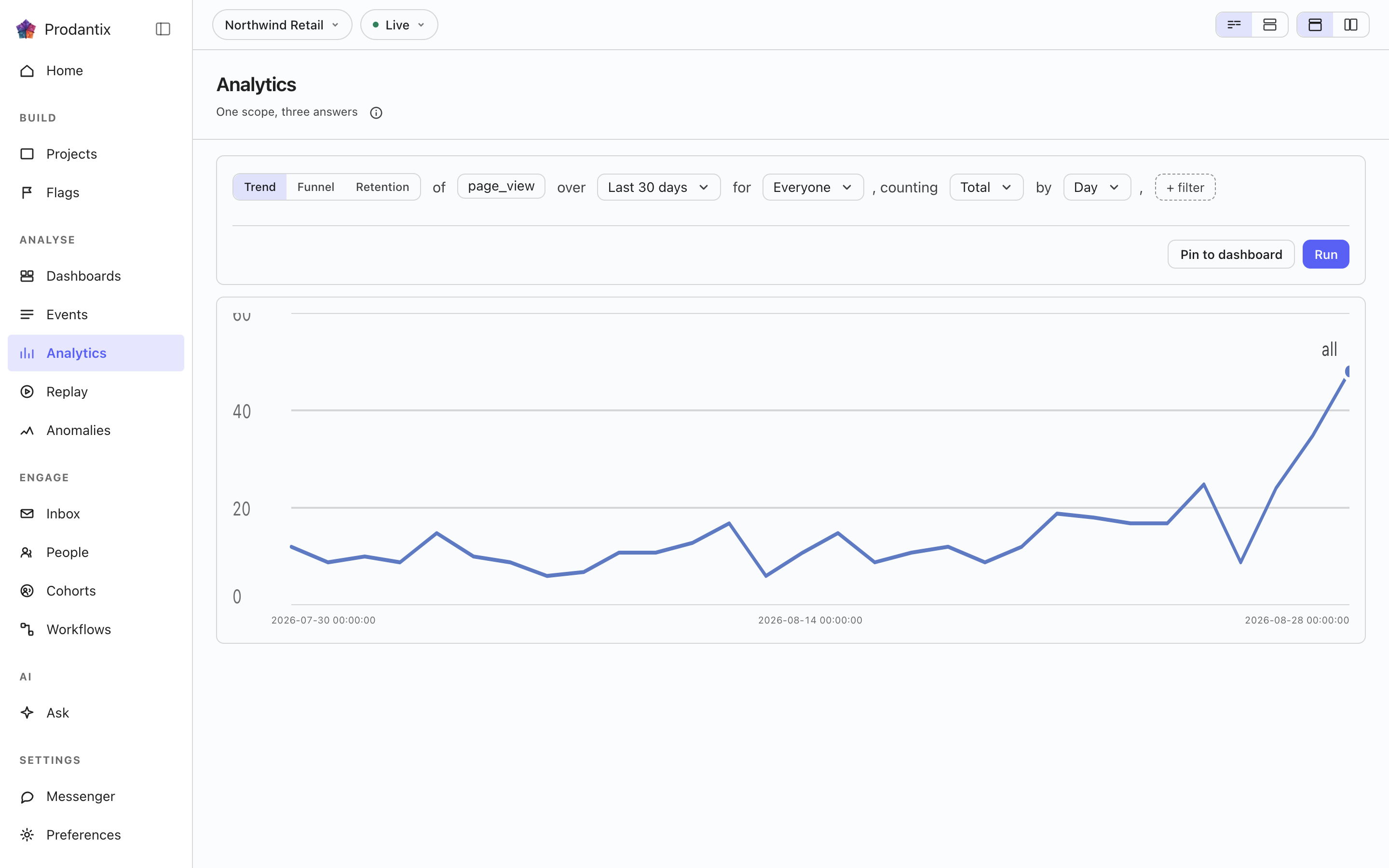
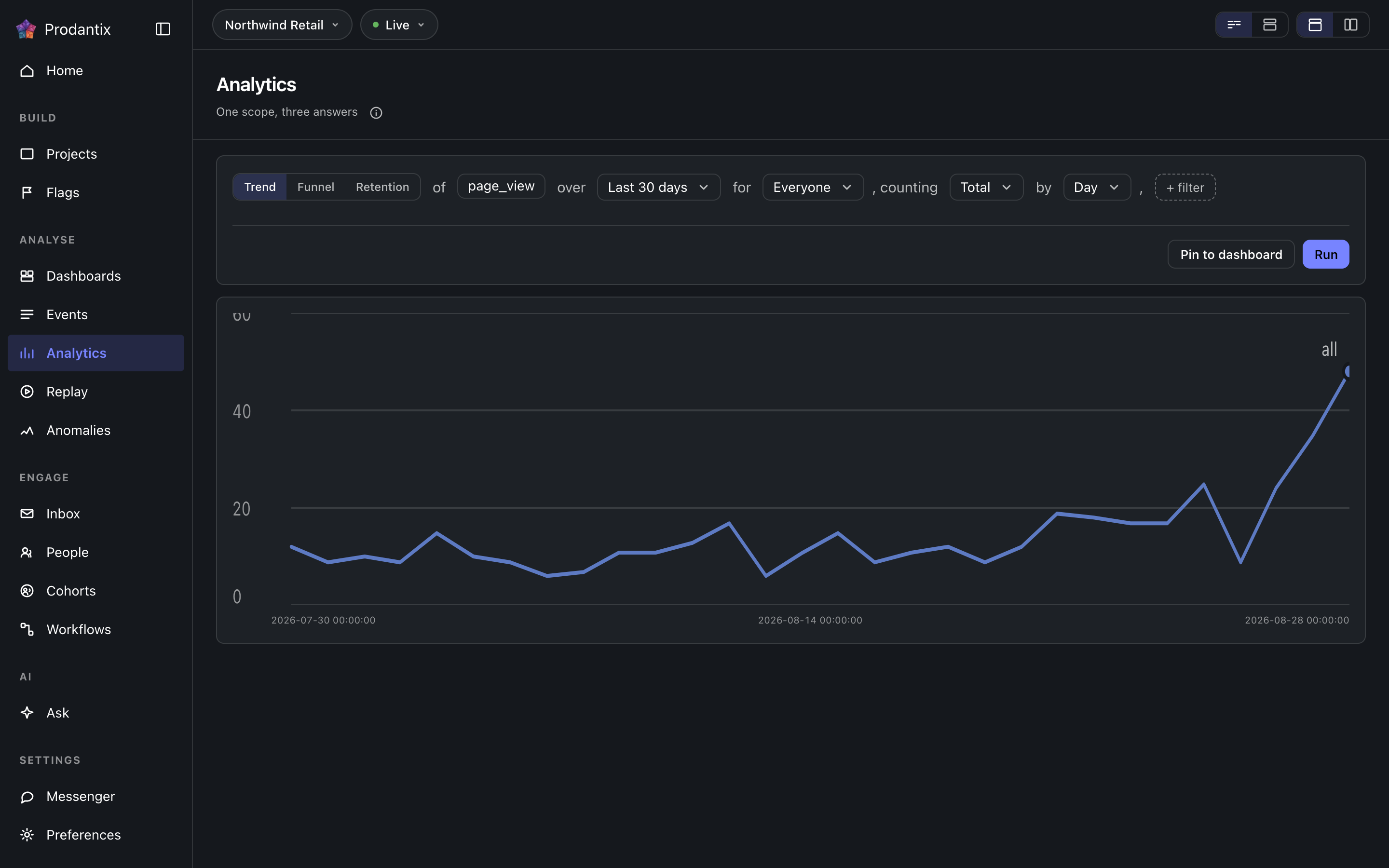
Six modes, one question
A trend counts one event over a range, as totals or unique people, at a granularity the range makes sensible. A funnel orders two or more steps and reports who made it through each. Retention asks who came back: an entry event, a return event and a matrix of periods. Paths asks what happened next, stickiness how many days a period's users came back on, and lifecycle who was new, returning, resurrecting or dormant in each period. Switching modes keeps everything the modes share, so a trend refined into a funnel does not start over.
Metrics and formulas


A trend is not one measure: Add a metric appends a letter, B onward, each its own event and its own total or unique users measure, the scope event staying letter A. Add a formula turns a row into an expression combining those letters with decimal numbers and + - * /, grouped with parentheses, up to 200 characters and never another formula's own letter. A point the formula cannot compute, a division by zero among them, draws as a gap rather than a zero.
The compared period


Compare asks the same question again over the window right before this one: Previous Period, Previous Day, Previous Week, Previous Month, Previous Quarter or Previous Year. Every series in the result gets a past twin, drawn apart from the current one rather than as a plain extra line, and the scope note names which one is picked. The compared period draws on Line, Stacked Line, Column, Stacked Column, Bar, Stacked Bar, Table and Metric; Pie draws the current period only.
Breakdowns


Breakdowns split a trend by up to three fields at once, an event property or one of the columns the DSL allow-lists: every series in the result carries the tuple of values it is one combination of, in the breakdowns' own order. The table reads every combination as its own row; the other chart types read the first breakdown as the series and fold the rest into its key.
Paths: what happened next


Paths start from an anchor event and walk one to five steps forward, or backward, within the anchor's session or a window of minutes or hours. Each step reports its top three, five or ten events with the share of that step's users, the events past the top folded into one row, and the users who took no further step. The default reading is one column per step; the same result reads as a sankey, with a block per event and a ribbon into each block of the next step, or as a tree that nests the next step's events under each event until its caret opens it.
Step by ደረጃ ማለት ምን እንደሆነ ይመርጣል። በክስተት ሲሆን፣ ጉዞው ከመልህቁ በኋላ ያሉት ከፍተኛ የክስተት ስሞች ናቸው። በገጽ ሲሆን፣ የገጽ እይታዎችን ብቻ ያገናዘበ ሲሆን የእያንዳንዱ ደረጃ ቁልፍ አስተናጋጁ ከመንገዱ ስም ጋር ነው፣ ስለዚህ ጉዞው የገጽ እይታ፣ የገጽ እይታ፣ የገጽ እይታ ከማለት ይልቅ ዋጋ፣ ምዝገባ፣ ክፍያ ብሎ ይነበባል። መልህቁም አብሮ ይቀየራል፦ የክስተቱ መስክ ጎብኚዎች በክልሉ ውስጥ በእርግጥ የደረሱባቸውን ገጾች የሚያሳይ መራጭ ይሆናል፣ በተጠቃሚዎች ብዛት ከፍተኛዎቹ መቶ፣ ምክንያቱም በእጅ የተጻፈ የገጽ መልህቅ ማንኛውንም ነገር ለመመለስ አስተናጋጅንና የመንገድ ስምን በትክክል መምሰል ይኖርበታል። በsankey እና በዛፉ ውስጥ የገጽ ደረጃ የመንገዱን ስም ከአስተናጋጁ ደብዛዛ ቅድመ-ቅጥያ ጋር ይሳላል፣ ስለዚህ አንድ መንገድ የሚጋሩ ሁለት አስተናጋጆች ተለይተው ይታወቃሉ።
Stickiness: how many days


Stickiness counts, for each week or month, how many of the event's users were active on one, two, three and more of its days. The result row steps between periods; the column chart reads one period at a time, and the table reads all of them.
Lifecycle: new, returning, resurrecting, dormant


Lifecycle sorts each period's users into four states: new were first seen in the period, returning were active in it and the period before, resurrecting came back after a period away, and dormant were active the period before and not in this one. First-seen reads the whole retained history, so a user is new once; activity is read one period before the range, so the first period's returning and dormant counts are real rather than zero by construction. The stacked column draws dormant below the zero line; the table adds a net column.
The sentence and its clauses


The question reads as a sentence: measure, event, range and any clauses, each word an editable control with the project's own event names suggested as you type. Property clauses narrow by what an event carried; a cohort clause scopes the whole question to a saved cohort. Whether the question composes as one sentence or as labelled groups is a stored preference, as is the split or stacked layout; nothing runs until Run, so a half-edited question never fires.
መለኪያዎች፣ ክስተቶች እና ማግለያዎች
እያንዳንዱ መለኪያ ክስተቶቹን በጠቅላላ ወይም እንደ ልዩ ተጠቃሚዎች ይቆጥራል፣ ወይም የያዙትን ቁጥር ያነባል፤ የመለኪያ መምረጫው Count፣ Sum of እና Average of ብሎ ይመድባል፣ የመጨረሻዎቹ ሁለቱ የመለኪያው ክስተቶች እንደ ቁጥር የላኩትን እያንዳንዱን ንብረት ይዘረዝራሉ፣ ከዚያም መስመሩ the sum of amount ተብሎ ይነበባል። የመለኪያ የክስተት መስክ እስከ 8 ክስተቶችን ይቀበላል፣ እነሱም በመለኪያው ፊደል ስር እንደ አንድ ተከታታይ በአንድ ላይ ይቆጠራሉ፣ መለያውም የሚቆጥረውን እያንዳንዱን ክስተት ይሰይማል። በአዝማሚያ ውስጥ ከቡድኑ በኋላ ያለው Exclude People who did an event ን ያገላል፣ ማለትም በጊዜ ክልሉ ውስጥ ቢበዛ ከ8 ክስተቶች አንዱን ያደረጉትን፣ ጥያቄው ከተገደበበት ቡድን ሌላ የሆነ A cohort ን፣ ወይም ሁለቱንም፤ እያንዳንዱ ክፍፍልም ከእሱ የሚገለሉ እሴቶችን ይቀበላል። የጊዜ ክልሉ የቀን መምረጫው ነው፤ Today፣ Yesterday፣ Last 7 days፣ Last 30 days፣ Last 3 months፣ Last 6 months እና Last 12 months፣ ወይም በሁለት ወር የቀን መቁጠሪያው ላይ የተመረጠ ማንኛውም የቀናት ክልል። ቀናት የመረጃ ማከማቻው እንደሚቆጥራቸው የUTC ቀናት ናቸው፣ አንጻራዊ የጊዜ ክልልም በስሙ ይቀመጣል፣ ስለዚህ በLast 30 days የተቀመጠ ሪፖርት ሁልጊዜ የመጨረሻዎቹን 30 ቀናት ያነባል። በሽቦው ላይ መለኪያ ተጨማሪ ክስተቶቹን በorEvents ይይዛል፣ መጠይቁ excludeDid እና excludeCohort ን ይይዛል፣ የንብረቶቹ ዝርዝርም በeventCatalog ላይ ያለው numericProperties ነው።
Reading a result as another chart


Every result row ends with the chart type it is read in. The menu lists Line, Stacked Line, Column, Stacked Column, Bar, Stacked Bar, Pie, Table, Metric, Funnel Steps, Retention Curve, Ranked Columns, Sankey and Tree, in that order, with the ones the result cannot take greyed rather than hidden. A trend, a stickiness period and a lifecycle take any of the series types; funnel steps take a funnel; the retention curve draws one line per cohort over its matrix; ranked columns, the sankey and the tree read paths; the table reads everything. Each mode remembers the type you chose, the URL carries it as ?chart=, and a pinned tile keeps it.
የገበታ ቅንብሮች
ከገበታ ዓይነቱ አጠገብ ያለው የቅንብሮች አዝራር የገበታውን የራሱ ቅንብሮች ይከፍታል፤ የገጹ አቀማመጥ መምረጫ እንደሚለው እንደ ብቅ ባይ፣ ከገበታው አጠገብ እንዳለ ፓነል ወይም እንደ መገናኛ። የLeft axis እና Right axis ትሮች እያንዳንዱ ዘንግ ይታይ እንደሆነ፣ ርዕሱን፣ አሃዱን (ቆጠራ፣ ምንዛሬ፣ በመቶ ወይም ብጁ)፣ ቅድመ ቅጥያና ድህረ ቅጥያ፣ ትላልቅ ቁጥሮች ይታጠሩ እንደሆነ፣ ስንት አስርዮሽ ከውጤቱ ቅድመ እይታ ጋር፣ ከነሱ የሚያልፉ እሴቶች ጠርዝ ላይ የሚቆረጡበት ወይም የሚተዉበት ቋሚ ዝቅተኛና ከፍተኛ ወሰኖች፣ እና መስመራዊ ወይም ሎጋሪዝማዊ ልኬት ያዘጋጃሉ። የTime axis ትር የጊዜ ዘንጉን ያሳያል ወይም ይደብቃል፣ ርዕስ ይሰጠዋል፣ እና በዕለታዊ ወይም በሰዓታዊ ገበታ ላይ ቅዳሜና እሁድን ያጠላል። የSeries ትር እያንዳንዱን መለኪያ ወይም ቀመር ወደ ግራ ወይም ቀኝ ዘንግ ያንቀሳቅሳል፣ ይህንንም በጥያቄው ውስጥ የእያንዳንዱ መለኪያ የራሱ ረድፍ ያደርጋል፣ እና Standard ቤተ ቀለምን ወይም ለቀለም ዕውርነት ደህንነቱ የተጠበቀውን ይመርጣል። እያንዳንዱ ለውጥ ገበታውን ወዲያው እንደገና ይሳላል፤ የተቀመጠ ሪፖርት ወይም ግንዛቤ ቅንብሮቹን ይይዛል፣ የስሪት ታሪኩ ለውጣቸውን ይጠቅሳል፣ እና የተሰካ ሰድር በእነሱ ይሳላል፣ በስልክም ጭምር። በሽቦው ላይ ከviz አጠገብ እንደ chart መስክ በሪፖርቶች፣ በግንዛቤዎችና በሰድሮች ላይ ይጓዛሉ።
የውጤቶች ሰንጠረዥ
ከገበታው ስር የአዝማሚያ የውጤቶች ሰንጠረዥ ለእያንዳንዱ ተከታታይ አንድ ረድፍ ይዘረዝራል፤ መስመሩ የተሳለበትን የቀለም ምልክት፣ የክፍፍል እሴቶቹን (ወይም ጥያቄው ብዙ ፊደሎች ወይም ክፍፍል ከሌለው መለኪያውን)፣ የድምር አምድ እና ለእያንዳንዱ ጊዜ አንድ አምድ፣ አዝማሚያው ሲነጻጸር ከእያንዳንዱ ጊዜ አጠገብ ያለፈውን መንትያውን ይዞ። የረድፍን ምልክት ሳጥን ማጽዳት ወይም የቀለም ምልክቱን መጫን መስመሩን ከገበታው ያወጣል፤ ረድፉ ባዶ የቀለም ምልክት ይዞ ደብዝዞ በሰንጠረዡ ውስጥ ይቆያል፣ መግለጫውም ባዶ አድርጎ ይይዘዋል፣ የራስጌው ምልክት ሳጥን ደግሞ ሁሉንም ረድፎች ይመልሳል ወይም ሁሉንም ያወጣል። ከሰንጠረዡ በላይ ያለው የፍለጋ መስክ ረድፎቹን እሴቶቻቸው የተተየበውን የያዙትን ብቻ ያሳጥራል፣ መስመርን ከገበታው ግን በጭራሽ አያወጣም። በውጤቱ ረድፍ ያለው የእይታ ቡድን በገበታ፣ ሰንጠረዥ እና ገበታ እና ሰንጠረዥ መካከል ይቀያይራል፤ ውጤት የሚከፈተው በገበታ እና ሰንጠረዥ ነው፤ የገበታው ዓይነት ሰንጠረዥ ሲሆን ሰንጠረዡ ራሱ ገበታው ስለሆነ ቡድኑ ይጠፋል። እይታው እና የወጡት ረድፎች እንደ ገበታ ቅንብሮቹ አካል ከሪፖርቱ ጋር በchart መስክ ውስጥ እንደ view እና hidden ይቀመጣሉ፣ ስለዚህ የተቀመጠ ሪፖርት፣ ግንዛቤ እና የተሰካ ሰድር ተመሳሳይ መስመሮችን ይስላሉ፣ በስልክም ጭምር። ሌሎቹ ሁነታዎች ከገበታው ስር የራሳቸውን ሰንጠረዥ በፍለጋ እና ያለ ረድፍ ምርጫ ያሳያሉ።
ከገበታው በላይ ያለው መስመር ውጤቱ ከስንት ጊዜ በፊት እንደተሠራ ያሳያል፤ ከገበታ ቅንብሮቹ አጠገብ ያለው አድስ ያንኑ ጥያቄ እንደገና ይጠይቃል። ከዚያ በኋላ በዓረፍተ ነገሩ ላይ የተደረጉ ለውጦች አሂድ እስኪጫን ይጠብቃሉ።
በአንድ ነጥብ ላይ እርምጃ መውሰድ
በገበታ ላይ ያለን ነጥብ መጫን ርዕሱ ነጥቡ ራሱ የሆነ ምናሌ ይከፍታል፤ ተከታታዩን፣ ክፍለ ጊዜውን እና እሴቱን ይዞ፤ በስልክ ላይ ረጅም መጫን ያንኑ ምናሌ ይከፍታል። ይህ ሪፖርት ጥያቄውን ቀይሮ እንደገና ያስኬደዋል። አጉላ አዝማሚያን ወይም የሕይወት ዑደትን ወደ ተጫነው ክፍለ ጊዜ ያጠባል፣ አንድ ደረጃ ይበልጥ ዝርዝር አድርጎ፤ ወርን ወደ ሳምንታት፣ ሳምንትን ወደ ቀናት፣ የአዝማሚያን ቀን ደግሞ ወደ ሰዓታት። በክፍፍል ነጥብ ላይ የማጣሪያው ረድፍ ለእያንዳንዱ እሴቱ ማጣሪያ ይጨምራል፣ የማግለሉ ረድፍ ደግሞ አንድ እሴትን ከክፍፍሉ ያወጣል፣ ለእያንዳንዱ እሴት አንድ ረድፍ፤ ክፍፍል በሌለው ነጥብ ላይ ሁለቱም በዚህ አጣራ እና ይህንን አግልል ተብለው ደብዝዘው ይቆያሉ። በቅርበት ይመልከቱ በእያንዳንዱ ሁነታ ነጥቡን የሠሩትን ሰዎች እና ክስተቶች ይዘረዝራል፤ የአዝማሚያ ወይም የሕይወት ዑደት ክፍለ ጊዜ፣ የፈንል ደረጃ፣ የማቆያ ሕዋስ፣ በመንገድ ላይ ያለ ክስተት እና የተጣባቂነት አምድ እያንዳንዳቸው የራሳቸውን ይጠራሉ። ተጠቃሚዎችን ይመልከቱ፣ ክስተቶችን ይመልከቱ እና ድጋሚ ማጫወቶችን ይመልከቱ በነባሪ በመገናኛ ሳጥን ውስጥ ይከፍቷቸዋል፣ ወይም በትንታኔ ገጹ ላይ ያለው መምረጫ እንደሚወስነው በጎን ፓነል ወይም በገጹ ራሱ ላይ። በሰዎች ውስጥ ክፈት፣ ወይም ክስተቶች፣ ወይም መልሶ ማጫወት፣ ነጥቡን ወደዚያ ገጽ ይወስደዋል፤ እዚያ አንድ ቺፕ ይሰይመዋል እና ያስወግደዋል፤ መምረጫው ነጥቡን በቀጥታ ወደ ገጹ ሲልከው ወደ ሪፖርቱ ተመለስ ወደ ጥያቄው ይመልሳል። አብራራ የዋና ምክንያት ትንተናን ይይዛል፤ ከፊቱ ክፍለ ጊዜ ባለውና ድምርን ወይም ልዩ ተጠቃሚዎችን በሚቆጥር የአዝማሚያ ነጥብ ላይ፣ መስመሩ በሁለቱ መካከል ለምን እንደጨመረ ወይም እንደቀነሰ የሚጠይቅ ጥያቄን በAsk ውስጥ ያረቅቃል። በAPI ውስጥ ነጥቡ እንደ projectPeople እና replaySessions የpoint ነጋሪ እሴት እና በevents ማጣሪያ ውስጥ ይጓዛል፤ የሪፖርቱ ዓይነት እና መጠይቅ፣ እንዲሁም ነጥቡን የሚለዩት ክፍለ ጊዜ፣ ደረጃ፣ ክስተት፣ ቡድን፣ ጊዜ፣ ንቁ ቀናት ወይም ሁኔታ።
ማብራሪያዎች
በአንድ ነጥብ ምናሌ ውስጥ ያለው ማብራሪያ ያክሉ ያንን ቀን፣ ወይም በቀን መቁጠሪያው ላይ የተመረጠ ክልል፣ በማስታወሻ እና እስከ አሥር መለያዎች ምልክት ያደርጋል። በሪፖርት ላይ የሚታይበት ማብራሪያውን በሪፖርቱ ብቻ ያቆየዋል ወይም ቀኖቹ በሚሸፍኑት በፕሮጀክቱ ሁሉም ገበታዎች ላይ ያሳየዋል፤ እንደ ሪፖርት ያልተቀመጠ ጥያቄ በፕሮጀክቱ ገበታዎች ላይ ያሳየዋል። ምልክቱ በቀን ዘንግ ላይ ይቀመጣል፦ በላዩ ላይ ጠቋሚውን ሲያደርጉ መስመሩን እና ማስታወሻውን፣ መለያዎቹን፣ ቀኖቹን እና ማን እንዳከለው የሚያሳይ ካርድ ይስላል፤ ጠቅ ማድረግ ደግሞ ካርዱን ለደራሲው እና ማብራሪያዎችን ለመጻፍ ለተፈቀደለት ማንኛውም ሰው አርትዕ እና ሰርዝ ጋር ክፍት ያደርገዋል። የገበታ ቅንብሮቹ ማብራሪያዎች ትር ይዘረዝራቸዋል እና ያጠፏቸውን መለያዎች ይደብቃል፣ ይህም ከሪፖርቱ ጋር ይቀመጣል፤ የሰሌዳ ሰቆችም ተመሳሳይ ምልክቶችን ይስላሉ። በኤፒአዩ ላይ annotations፣ createAnnotation፣ updateAnnotation፣ deleteAnnotation፣ የannotationChanges ምዝገባ እና /v1/projects/{projectId}/annotations ናቸው፤ ወኪሎች በprodantix.annotations.list እና prodantix.annotations.create ያነቧቸዋል እና ያክሏቸዋል።
Results, and keeping them
A trend draws as a series, a funnel as its steps with the drop between them, retention as a matrix whose rows are entry periods, paths as ranked columns per step, stickiness as columns over days active and lifecycle as a stacked column. Once a result exists, Pin saves the question to a board on Saved, where its tile re-runs the query on every open and draws it as the chart type it was pinned in.
ከPin ጎን Save አለ። የመጀመሪያው ረድፉ As an insight ነው: ጥያቄው ሙሉ ለሙሉ፣ አርታኢውና ገበታው፣ በጥያቄ ሳጥን በሚጠየቅ ስም ስር ይቀመጣል፣ ከዚያ የካርዱ ራስ የተከፈተውን ግንዛቤ በቺፕ ላይ ይሰይማል፤ አድራሻው ?insight= ይይዛል፣ ስለዚህ አገናኙ ተመልሶ ይከፍተዋል። ጥያቄውን ያርትዑ፣ የSave የመጀመሪያ ረድፍ፣ አሁን Update፣ ማርትዖቱን በተቀመጠው ላይ እስኪጽፍ ወይም ሁለተኛው ረድፉ፣ Save as a new insight፣ ማርትዖቱን እንደ ሌላ እስኪያስቀምጥ ድረስ ቺፑ ከስሙ በኋላ changed ይነበባል። ቀጣዩ ረድፍ Users as a cohort ነው: ውጤቱ የቆጠራቸውን ሰዎች ሰይሞ እንደ ቋሚ ቡድን ያስቀምጣቸዋል። ዝርዝሩ ጥያቄው እንደሮጠ በሰርቨሩ ላይ ይዘጋጃል፣ ስለዚህ ገበታው የሳለውን ሳይሆን ውጤቱ የቆጠረውን ሁሉ እስከ 100,000 ድረስ ይይዛል፣ ማንንም ያልቆጠረ ውጤት ውድቅ ይደረጋል። ቡድኑ የተነበበበትን ዓረፍተ ነገር ይይዛል፣ ቋሚ ዝርዝር ስለሆነም በጭራሽ እንደገና አይገመገምም: በሚቀጥለው ሳምንት የሚጠየቀው ያው ጥያቄ ስለሚቀጥለው ሳምንት ይመልሳል፣ ቡድኑ ግን ዛሬ የቆጠራቸውን አሁንም ይይዛል። የተቀመጡ ግንዛቤዎች በSaved ውስጥ ባለው Insights ትር ላይ ይዘረዘራሉ። ከመለያያ መስመር በታች ወደ CSV ላክ አለ፦ አገልጋዩ ውጤቱን ጥያቄው እንደተካሄደ ከቀረበው ጥያቄ እንደ ተመን ሉህ ይጽፋል፣ ለእያንዳንዱ ጊዜና ክፍፍል አንድ ረድፍ፣ ለእያንዳንዱ የመለኪያ ፊደል አንድ አምድ፣ ከገበታው ጥቂት ከፍተኛዎች ይልቅ እስከ ሞተሩ ሺህ ድረስ ያሉ ሁሉንም ጥምረቶች፣ እና ፋይሉን በመሣሪያውና በጊዜ ክልሉ ይሰይማል። በመጨረሻ ገደብ ይከታተሉ አለ፣ በአዝማሚያ ውጤት ላይ ብቻ የሚሰራ: ውጤቱን ገና ግንዛቤ ካልሆነ እንደ ግንዛቤ ያስቀምጠዋል፣ ከዚያ በመጀመሪያው መለኪያው ላይ ከበላይ፣ ከበታች ወይም በተወሰነ መጠን ሲቀየር አንድ ወሰን ይገልጻል፣ በቀን አንድ ጊዜ በግንዛቤው መጨረሻ ሙሉ ክፍል ላይ ይጣራል፤ ወሰኑ ሲታለፍ ግንዛቤው በትኩረትዎን ይሻል ውስጥ ይዘረዘራል እና ተመልሶ የተከፈተው ግንዛቤ ወሰኑን በገበታው ላይ እንደ ባንድ ይስላል፣ ማንቂያውም ዋጋው ሲመለስ በራሱ ይጠፋል።
Save as report ጥያቄውን በስብስብ ላይ እንደ ሪፖርት ይይዛል፣ በሁለት ደረጃዎች: መጀመሪያ ስሙና መግለጫ፣ ከዚያ ስብስቡ፣ ሦስት ረድፍ ከፍታ ካለው የሚፈለግ ዝርዝር ውስጥ ተመርጦ፣ New board ከሥሩ። ከዚያ አድራሻው ?report= ይይዛል፣ የገጹ ራስ ፕሮጀክት › ስብስብ › ሪፖርት ተብሎ ይነበባል ስብስቡ አገናኝ ሆኖ፣ የካርዱ ራስም የተከፈተውን ሪፖርት በቺፕ ላይ ይሰይማል፣ አርታኢው ከተቀመጠው ከተለየ ጀምሮ ከስሙ በኋላ changed ተብሎ ይነበባል፣ Save report አርትዖቱን እንደ ቀጣዩ ስሪት እስኪጽፍ ወይም Save as new report እንደ ሌላ እስኪያስቀምጠው ድረስ። ሪፖርት ተከፍቶ ሳለ የ Save ምናሌ ደግሞ ይሰይመዋል፣ ወደ ሌላ ስብስብ ያንቀሳቅሰዋል ወይም ያባዛዋል፤ መንቀሳቀስ ወዲያው ይፈጸማል ስናክባሩም ከ Undo ጋር ይናገራል። ከካርዱ ስር የስሪት ንጣፉ የአሁኑን ስሪት፣ ማን እንዳስቀመጠውና መቼ ይሰይማል፤ Show history እያንዳንዱን ስሪት ይዘረጋል፣ ምን እንደተለወጠ፣ በማንና መቼ፣ ሦስት ግቤቶች እይታ ውስጥ፣ ከአሁኑ በስተቀር ከእያንዳንዱ ጎን Restore አለ፣ መመለስም ታሪኩን እንደገና ከመጻፍ ይልቅ የተመረጠውን የሚገለብጥ አዲስ ስሪት ይጽፋል። ሪፖርቶች በ Saved የ Reports ትር ላይ ይዘረዘራሉ።
ሪፖርትን ማጋራት
የተቀመጠ ሪፖርት ሲከፈት፣ የማስኬጃው ረድፍ Copy link እና Share ያቀርባል። Copy link የሪፖርቱን አድራሻ ከጊዜ ክልሉ፣ ከቡድኑ እና ከማጣሪያዎቹ ጋር ይቀዳል፣ ሪፖርቱን መክፈት ለሚችል በኩባንያው ውስጥ ላለ ማንኛውም ሰው ይከፈታል። Share ሁለት ትሮችን ይከፍታል፣ መጀመሪያ Teammates። Teammates ሪፖርቱን በኩባንያው ውስጥ እስከ 20 ሰዎች ይልካል፣ ማስታወሻ ካከሉ ከእሱ ጋር፦ እያንዳንዳቸው በኮንሶሉ ማሳወቂያዎች፣ ፑሽ ባበሩበት እንደ ፑሽ፣ እና በኢሜይል ይቀበሉታል። መስኮቱ ክፍት ሆኖ ለማን እንደተላከ ይናገራል።
Public link አገናኙ ያለው ማንኛውም ሰው ሳይገባ ሊከፍተው የሚችል ለንባብ ብቻ ገጽ ይሠራል፦ ሪፖርቱ በመጨረሻ ሲሄድ እንደነበረው፣ ከገበታውና ከቁጥሮቹ ጋር ነገር ግን ያለ ጥያቄው ማጣሪያዎች፣ ቡድን ወይም ሰዎች፣ እና ሪፖርቱ እንደተቀመጠው በሄደ ቁጥር ያድሰዋል። አገናኙ በተመረጠው ቀን መጨረሻ መስራት ያቆማል፣ ከነገ እስከ 90 ቀናት ድረስ፣ በ In 30 days ይጀምራል፤ በርቶ እያለ ሌላ ቀን መምረጥ ያድሰዋል፣ ማጥፋቱም ወዲያውኑ ያቆመዋል። ይፋዊ አገናኝ መፍጠር የራሱ ፈቃድ ያስፈልገዋል፣ ወኪሎች ፈጽሞ የማይይዙት፣ ያለዚህ ፈቃድ ሚና ደግሞ ማብሪያው ተሰናክሎ ይህን የሚናገር መስመር ያያል።
Where this meets the API
The concept is the Analytics pillar. On the wire, the six modes are six queries: runQuery, runFunnel, runRetention, runPaths, runStickiness and runLifecycle, with event names suggested from eventCatalog and, for a path stepping by page, the anchors from pathsPages (GraphQL reference). Pinning writes the question into a board through updateDashboard, with the report's kind and the chart type beside its query; saving an insight is createInsight, Update is updateInsight, and Saved's Insights tab reads insights. Save as report is createReport, Save report is updateReport, the strip's Restore is restoreReportVersion, and Saved's Reports tab reads reports. Sharing reads the public link with reportPublicLink, turns it on or renews it with setReportPublicLink, turns it off with turnOffReportPublicLink and sends to teammates with shareReport, while reportShareChanges streams every change; a visitor's page reads /v1/shared-reports/{token} (API reference).